Category: Technology

  • How Google Will Ruin the Cloud

    I really enjoy having access to my stuff in the cloud.  Docs I can pull down anywhere, anytime, mail that isn’t tied down to a single machine, etc.

    Unfortunately, there are problems with the cloud, and with handing off services to companies like Google, which most of us aren’t thinking of.

    Over the past couple months I have had 4 major problems big cloud based services.  In each case, save one, it was impossible to get actual customer service from the company to resolve the issue.  Not only could I not get a person on the phone to fix my problem, there wasn’t an email, or in fact, any way whatsoever to contact the people responsible for the service.

    Now I am not talking about Joe’s Web Service and Tattoo Palor.  I am talking about Google and Yahoo, and their services FeedBurner, Picasa and Flickr.  It wasn’t like I was asking the world, simply to get access to my content, account, etc. and in each case I was unsuccessful at getting any level of response.

    None…zip…nadda.

    So ask yourself, how will you feel when you go to fire up your big presentation at ToolCamp 2014 and you find you can’t access, then to compound the problem, you find that you cannot even get email support, much less someone on the phone.

    Its widely known in technology circles that Google hates people.  They don’t want to interact with us on a personal level at all, preferring to let us talk to each other in Google Groups.  This is all fine and dandy, right up until the point that they have something wrong in their system that needs to be corrected.

    The model cannot work.  We shouldn’t accept it, and we certainly shouldn’t count on it.  The cloud is powerful, but its doomed if we’re expected to fly without a customer support net.  No matter how good your system is, its going to have problems and at that point you (Mr. Google) need to actually talk to the customers you just screwed, so you can fix their problems.

    Don’t hold your breath.

  • Updated to WordPress 3.0

    Nothing major, just did a quick backup then hit the upgrade button.  While things may have changed significantly in the backend code, there really isn’t much to show you here.

    • WordPress MU (the multiblog variant of WordPress that is used on WordPress.com) is now built into the maintstream code.  Thus endeth the tyranny of MU, a code branch I personally despised.
    • Custom menus make it really easy to create a special nav menu.  I’ve already used this, and it’s a nice feature.
    • They finally let you pick your own username and password for the admin user during installation.  Seems like a little thing, but it’s been a system issue since day one with legions of users forgetting to either change the admin user password or to write it down.
    • Custom Post Types and Custom Taxonomies – I haven’t used either, but I suspect that I will soon.  Both of these are hardcore CMS functions.
    • Scads of new hooks and functions for plugin and theme developers.
  • My Open Source Web Dev List

    Here is the list of stuff I load onto my machine right after firing it up for the first time:

    1. 7-zip – open source package for handling zip, tar, gzip
    2. WinSCP – ftp, scp, sftp
    3. Putty – in case I need to talk to a server, this is my preferred SSH client
    4. TextPad – all the text editor I need for just about any task. Don’t forget to tell it to syntax highlight PHP and turn on line numbers! (not open source, but cheap and good)
    5. Mysql Workbench – a nice little tool for MySql admin and query browsing
    6. Firefox, Safari, Chrome browsers – gotta test in all the browsers!
    7. Firefox web developer toolbar
    8. Hex Color Finder – use the dropper to get the hex color of anything on your screen
    9. Tortoise SVN – my fav svn tool
    10. OpenOffice – for all the stuff you used to use Windows Office for…
    11. Gimpshop – taking the place of Photoshop (hint: do not install anywhere other than program files – BE SURE!)
    12. Irfanview – batch editing photos, contact sheets, etc.
    13. Handbrake – video editing
    14. Audacity – Audio editing
    15. Tweetdeck – twitter client
    16. Skype – internet phone and chat

    That’s it.  With all that loaded, I’m ready for 95% of my computing needs.  What would you add to the list?

  • History Channel tackles “America The Story of Us”

    I’m an unabashed history nerd.  I love history, and I’ll admit I’ve had a real chip on my shoulder for the History Channel for the past two years, since they stopped doing history and started running shows like “MonsterQuest”, “UFO Hunters” and “Ice Road Truckers”.  No offense to those shows, I’m sure they’ve got their audiences, but they most certainly are not history, and neither is most of the other content that’s filling the schedule at History.

    Its easy to understand why they’ve gone the route they have.  Surely there is a finite market for shows on the Battle of Antietam, or the cumulative affect of the protestant reformation, and yes, even with Dan Brown’s books, we have pretty much exhausted the tales of the Templars.

    So it was with an wary eye that I sat down to watch last nights “Amerca The Story of Us”  series.

    One first glance, I noticed they played fast and loose.  They mentioned Plymouth, they mentioned Jamestown, then they jumped forward to the decade just prior to the Revolutionary War, which would be akin to jumping forward in history from the First World War until now.  After all, nothing much to see there.

    Then I had issue with the obvious high level view.  They had Paul Revere completing his ride to Lexington and Concord, while any self-respecting Bostonian can tell you it was indeed Samuel Prescott that completed the ride, with Paul Revere detained by the British in Lincoln.

    It continues that way, jumping from Concord to the Capture of New York.  Southerners will delight in getting nary a mention until Yorktown.

    Still, the note at the end of the show wraps it all up nicely.  They will be providing copies to every school in the country.  As such, the show probably hits it’s mark.  A high level summary that may, in it’s fast paced vignettes manage to make in roads into the minds of our youth.

    The first episode replays Wed. night and it is my intention to make a special evening out of it in the Cahill house with my 10 and 12 year old daughters *(who will sign in unison the second they see the History Channel logo…).  I encourage you to consider the same.

    This isn’t meant as a authoritative history of us, it is meant more as an entre to the history of us, and in that regard, it hits the mark.  We’ll see how my two tweenage critics like it Wed.  In fact, perhaps I’ll let them blog their thoughts here.
    Aaron Barnhardt *(my go to tv critic) of The Kansas City Star (and TVBarn.com where I grab his stuff…) summed it up nicely:

    What is surprising — not to say disorienting for anyone older than 30 — is how shamelessly History has aimed “America: The Story of Us” at Generation ADD.

    But that’s for a reason. The channel’s PR department informs us that History “will for the first time offer a DVD of the entire 12-hour series to every single school and accredited college in America — free of charge.”

    He’s spot on there.  It is indeed history for the Generation ADD.  But perhaps that’s just what we need right now.
    Maybe this will help me drag the kids to the Pequot Museum this weekend.  😉
  • Skype Issue

    I use Skype a lot.  Be it to communicate with developers in the Ukraine, or to talk with the relatives spread around the globe, I pretty much leave it on all the time.  I prefer it to my cell phone for calls.

    So it’s funny to me to complain about the service, as in close to 7 years of use, this is about the only problem I’ve had:  they apparently don’t understand the meaning of “Block This User.”

    In addition to the regular phone service, I use their chat with coworkers and friends quite a bit.   However I’ve started to have a big problem lately with the same spammers IMing me via Skype all the time.  It got so bad this weekend that I actually *gasp* had to check in with their customer support site.

    From what I read, and am now seeing as a message in my Skype console, you cannot block users if your privacy allows anyone to contact you.

    That doesn’t work for me.  I need to be accessible to my coworkers, etc. and it shouldn’t be up to me to plug everyone I *might* want to chat with in the Skype contact list.  Instead, when I say “Block This User” I expect just that.  Don’t ever let them contact me again.   Even better, Skype should watch for people with excessive blockings and remove them permanently.

  • On the Fly Website Translation in Google Chrome

    I stumbled on this neat trick the other day while having a look for information on a Russian website.  If you are browsing using the Google Chrome Browser and open Google Translate in one tab, when you surf to any foreign language sites, it will offer to translate the site for you.  You click yes, and bang, you’ve got that site in English. The actual translation is as good as the library they have, hence Spanish is pretty good, while you can probably bet that Urdu or Swahili will offer mixed results.

    I’m now using Chrome for most of my browsing although I do use Firefox for css debug, and IE just to be sure my work is accessible in all browsers.  I expect we’ll see Chrome really take off this year.

  • The Localized SEO Project Yeilds Fruit

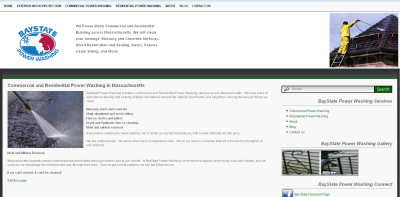
    2 weeks after go live, BayStatePowerWashing.com is now fully indexed in Google.  The site initially had Google position only for it’s own name, due to the use for frames in the old site design.  Here is a sample of some of the results:

    • residential power washing massachusetts – #1
    • commercial power washing massachusetts – #3
    • power washing weston ma – #1
    • power washing shrewsbury ma – #1

    Excellent progress.  Even better news is that the site owner has the ability now to create new pages which will target other local search terms.  In other words, he has the ability to be where he needs to be.  On top of that, he’s working on fine tuning the marketing message, so we’ve got the fuel to get Google position, and the content to provide the potential customer the right message when they get to the site.  A potent combination.

    The even better news is these results are all “white hat” – we’re not using any nefarious techniques to fool Google.

  • New Netcast: A History of the World in 100 Objects

    I’ve been listening to this netcast for the past two days on the way to work, a major savior for me since the weather has made for epic commutes.  It comes from the folks at the BBC and the British Museum and it’s called “A History of the World in 100 Objects.”

    From their “about” page:

    At the heart of the project is the BBC Radio 4 series A History of the World in 100 objects. 100 programmes, written and narrated by Neil MacGregor, Director of the British Museum, and focusing on 100 objects from the British Museum’s collection.

    The programmes will travel through two million years from the earliest object in the collection to retell the history of humanity through the objects we have made. Each week will be tied to a particular theme, such as ‘after the ice age’ or ‘the beginning of science and literature’, and the programmes will broadcast in three blocks, in January, May and September.

    Yup, I can hear my daughters sighing from here…it’s history.  The thing is, this is really different.  It’s not the story of how one group enslaved another, but more it’s a history of how we developed across the globe as people.  It’s told through the artifacts we left behind, and in those objects, they find the way to show us our own evolution.  A truly different look at the world, and all in installments of about 15 minutes each.

    Whereas I’d usually throw a “if you like history…” disclaimer on a post like this, it’s really not necessary.  If you’re interested in people, or what’s made us who we are, this netcast is a winner for you.  It has excellent audio production quality, gets right to the point, and generally is something everyone should take the time to listen to.

    You can download the netcast direct from iTunes or get it right off their site here.

  • Designing for the iPad?

    I was listening to a netcast this morning (This Week in Media) and the host Alec Lindsey put forward the suggestion that many content related businesses were planning on developing specific content for the iPad.  I had a couple thoughts…
    • Why would you funnel development dollars into creating something for a single platform, when that platform has not yet been released.
    • How could you develop effectively for a platform, when that platform has not yet been released.
    • The suggestion was made that there would be 5 million iPads in the wild within the year.  Maybe, but I wouldn’t count on that…and even at that, 5 million is a mere drop in the bucket compared with the internet at large.
    • Specific versions for ANOTHER platform?  C’mon, we’re back to the old Mac vs. Pc, Netscape vs. IE battles here.  We have a common mode of delivery for these types of devices, it’s HTML, have you ever heard of it?

    If the iPad becomes wildly popular, I’ll have a look at developing specific content for it, but for now, I’ll expect users with that device to fire up Safari and visit the old fashioned way.  We’ll get an idea today as preordering started about 9 minutes ago for the wi-fi version of the product.

  • New Site: BayStatePowerWashing.com

    BayStatePowerWashing.com

    Over the past few weeks I pulled together a new site for my friend Ryan Mowry, owner of BayState Power Washing.  The site is built in wordpress and uses a fairly standard template.  Points to consider:

    • This is a test of a new localized SEO tactic.
    • The site hadn’t been indexed yet by Google yesterday, the last time I checked.
    • Site is fully editable by Ryan.
    • We did include a blog, where Ryan will be posting information of use to Massachusetts home owners.
    • I’m not a fan of 100% width sites…

    Give the site a check – especially if you’re looking for the best power washing service in Massachusetts for your home or business.